Best Firewall Apps for Mac in 2026: Little Snitch, LuLu, and More
Compare the best Mac firewall apps in 2026: TinyShield, Little Snitch, LuLu, Radio Silence, and Little Snitch Mini. Features, prices, and who each one is for.
Every app on your Mac can talk to the internet. Most of the time, that is fine. But some apps send analytics, phone home in the background, or connect to servers you have never heard of.
A Mac firewall app shows you those connections and lets you decide which ones are allowed. There are several good choices in 2026. This guide helps you pick one in five minutes.
In this guide, you will learn:
- Why the built-in macOS firewall is not enough
- The five best firewall apps for Mac, with pros and cons
- A side-by-side comparison table
- Which app fits beginners, power users, and budget users
Do you need a firewall app on Mac?
macOS includes a firewall in System Settings → Network → Firewall. It is useful, but it only controls incoming connections.
It does not:
- ❌ Stop an app from sending data out
- ❌ Show you which domains each app connects to
- ❌ Ask you before a new app goes online
If you care about any of these, you need an outgoing firewall app.
What makes a good Mac firewall?
We compared each app on:
- Visibility: Can you see each app, domain, and IP address clearly?
- Control: Can you block an app, a single domain, or everything?
- Alerts: Can it ask before a new app connects?
- Ease of use: Can a non-expert understand it in a few minutes?
- Price: Free, one-time, or paid upgrades?
1. TinyShield: best for clear monitoring and quick blocking
TinyShield is a native macOS app from the team behind Proxyman. It focuses on one simple workflow: see what each app connects to, then block what you do not want.
Pros:
- ✅ Connections grouped by app, with readable hostnames
- ✅ Block an app, domain, wildcard domain, or IP with a right-click
- ✅ Allow All, Require Approval, and Block All modes
- ✅ GeoIP map to see where traffic goes
- ✅ Modern, native Mac design with a low learning curve
- ✅ One-time purchase, with a Lifetime Deal option
- ✅ Monitored data stays on your Mac
Cons:
- ❌ Requires macOS 15 or later
- ❌ Fewer advanced options than Little Snitch, such as port or protocol rules
- ❌ Require Approval, Block All, and unlimited rules need TinyShield PRO
Best for: Mac users who want a clean, modern firewall without becoming a network expert.
2. Little Snitch: best for power users
Little Snitch by Objective Development is the most feature-rich option on this list.
Pros:
- ✅ Connection alerts and a Silent Mode
- ✅ Network Monitor with map, charts, and up to 12 months of traffic history
- ✅ Rules by app, server, domain, port, or protocol
- ✅ Profiles, rule groups, blocklists, and DNS encryption
- ✅ Command-line tool for automation
Cons:
- ❌ Paid license
- ❌ Many options can feel overwhelming for simple tasks
Best for: Advanced users who want the deepest rule system. Compare it with TinyShield in TinyShield vs Little Snitch.
3. LuLu: best free and open-source firewall
LuLu by Objective-See is free and open source.
Pros:
- ✅ Free, with source code on GitHub
- ✅ Alerts for new outgoing connections
- ✅ Program and endpoint rules, block lists, passive mode, and profiles
Cons:
- ❌ Outgoing traffic only
- ❌ Hostname blocking depends on the app's network APIs; some browsers can only be blocked by IP
- ❌ More technical interface
Best for: Users who want a free firewall and value open source. See TinyShield vs LuLu.
4. Radio Silence: best for no pop-ups
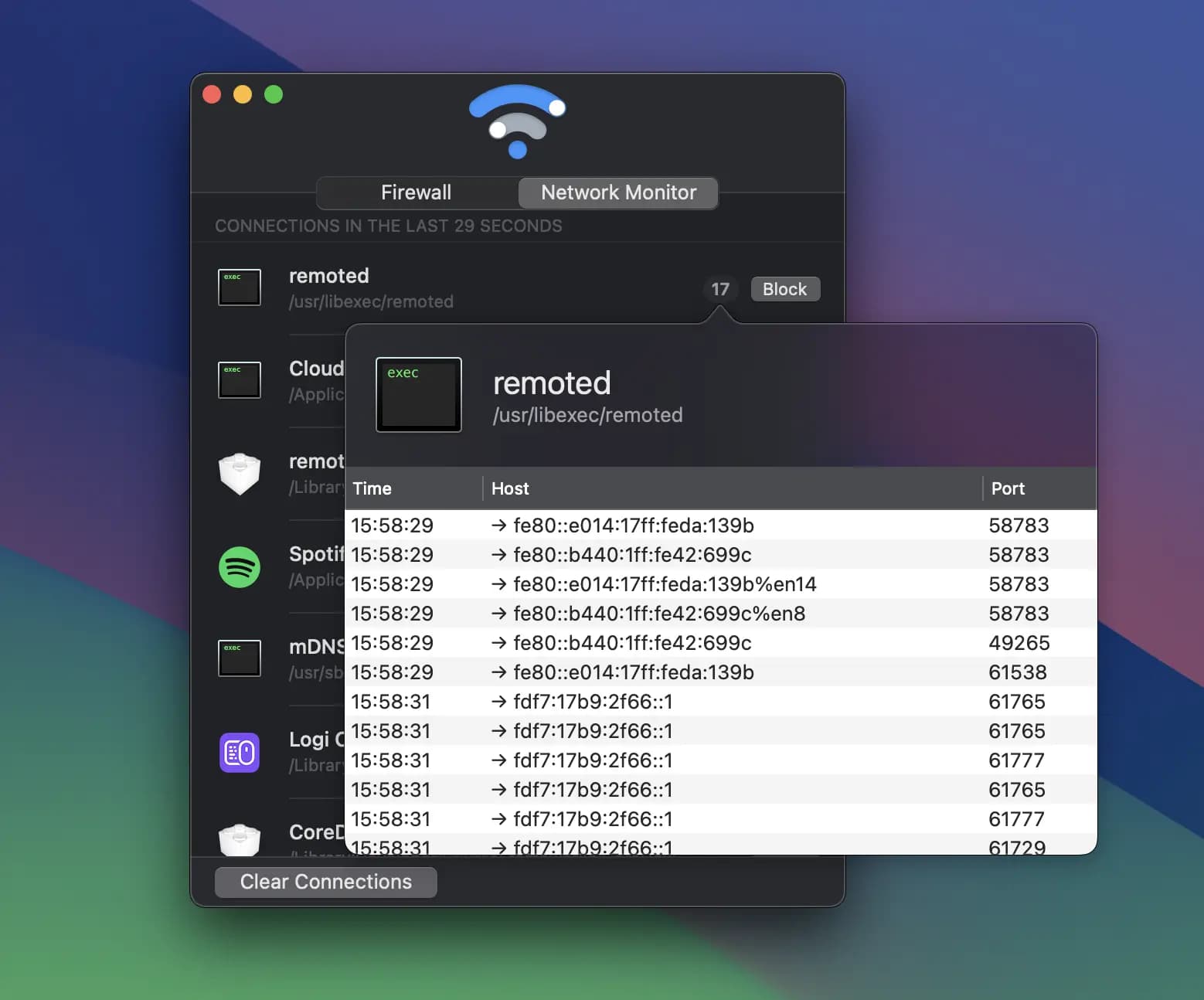
Radio Silence takes a quiet approach. There are no connection alerts. You choose apps to block from its network monitor.
Pros:
- ✅ Low one-time price
- ✅ No pop-ups
- ✅ Real-time network monitor with one-click app blocking
- ✅ Also blocks child processes of a blocked app
Cons:
- ❌ Designed around app-level blocking
- ❌ No prompt when a new app connects, so you must check the monitor yourself
Best for: People who know which apps they want to block and never want alerts.
5. Little Snitch Mini: best free network monitor
Little Snitch Mini is a lighter version of Little Snitch on the Mac App Store.
Pros:
- ✅ Free live connection list, map, and traffic charts
- ✅ Simple design from an experienced team
Cons:
- ❌ Blocking requires an in-app purchase
- ❌ Fewer controls than the full Little Snitch
Best for: Users who mainly want to watch traffic for free. More free options are in Free Little Snitch Alternatives for Mac.
Side-by-side comparison
| TinyShield | Little Snitch | LuLu | Radio Silence | LS Mini | |
|---|---|---|---|---|---|
| Price | Free to try, one-time PRO | Paid | Free | One-time | Free monitor, paid blocking |
| Monitor by app | ✅ | ✅ | ✅ | ✅ | ✅ |
| Block apps | ✅ | ✅ | ✅ | ✅ | Paid |
| Block single domains | ✅ | ✅ | ✅ | — | Paid |
| Ask before new apps | ✅ PRO | ✅ | ✅ | ❌ | — |
| Map view | ✅ | ✅ | ❌ | — | ✅ |
| Learning curve | Low | High | Medium | Low | Low |
"—" means the feature is not listed on the official product page. Features and prices change, so always check each official site before buying.
How to choose in 30 seconds
- "I want something simple and modern." → TinyShield
- "I want every possible option." → Little Snitch
- "I want it free and open source." → LuLu
- "I never want a pop-up." → Radio Silence
- "I only want to watch traffic." → Little Snitch Mini
Try TinyShield in two minutes
- Download TinyShield and move it to Applications.
- Install the Network Extension and approve it in System Settings. See the setup guide.
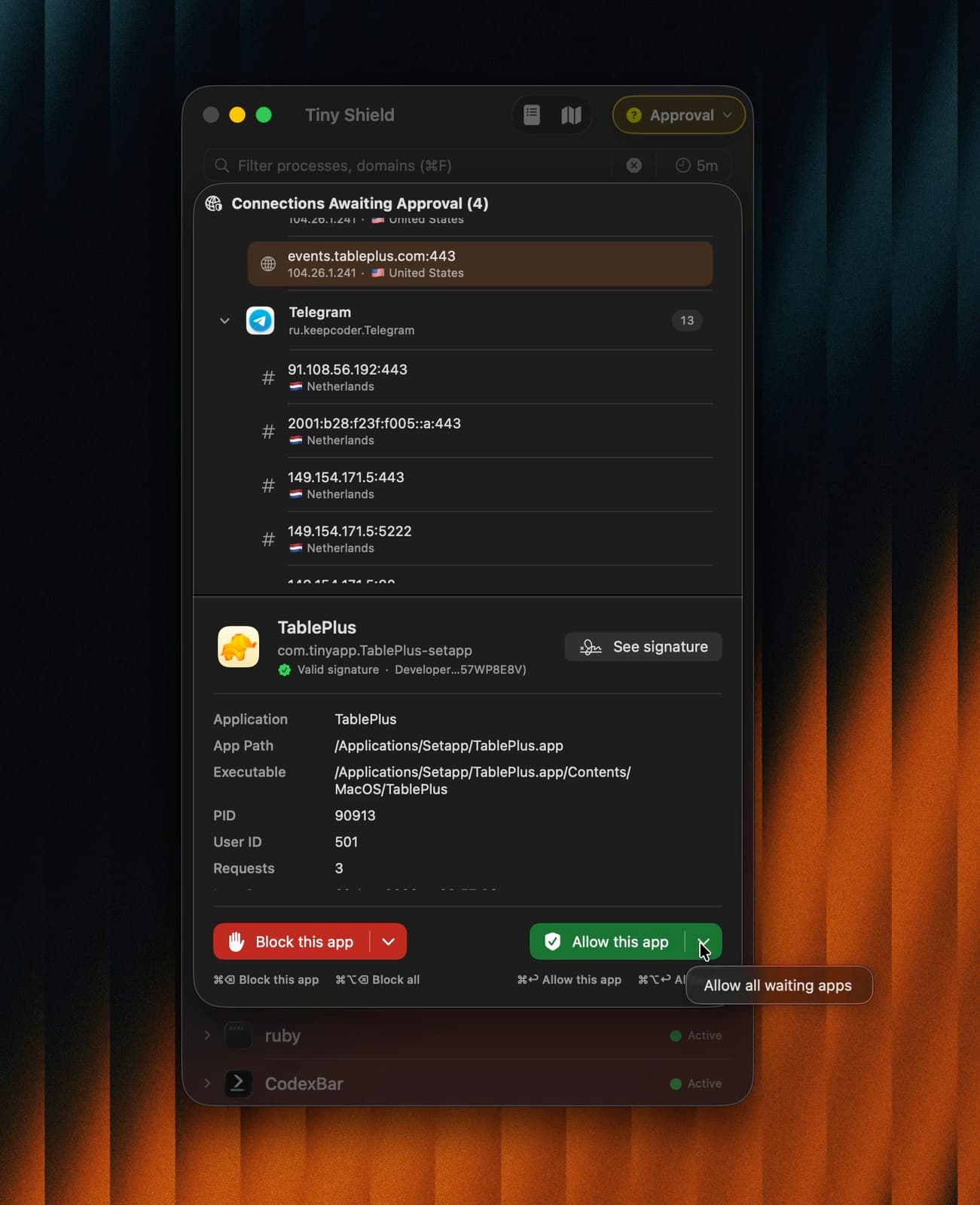
- Open any app and watch its connections appear.
- Right-click a domain you do not trust and select Add to Block List.
- Switch to Require Approval to review new apps before they connect.
Tip: run one firewall at a time. Several connection filters running together can make results confusing and break connections.
Conclusion
There is no single "best" firewall for everyone. The right one depends on how much control you want and how much time you want to spend learning it.
- Want the most power? Little Snitch.
- Want free and open source? LuLu.
- Want a clean, modern app that shows what your Mac is doing and blocks it in one click? TinyShield.
New to Mac firewalls? Start with how to see which apps are using the internet and how to block an app from accessing the internet.
Download TinyShield or see the pricing plans.
Ready to Protect Your Mac?
Experience the power of TinyShield's network monitoring and protection. Keep your Mac safe from threats while maintaining optimal performance.
Download TinyShield