Little Snitch vs LuLu: Which Mac Firewall Should You Use?
Little Snitch vs LuLu compared: features, price, alerts, and limits. See which Mac firewall fits you, and when TinyShield is the simpler middle ground.
You want to control which apps on your Mac can reach the internet. You search for a firewall and find two names again and again: Little Snitch and LuLu.
One is a long-running commercial app with many advanced options. The other is free and open source. Which one should you install?
In this guide, you will learn:
- What Little Snitch and LuLu each do well
- The real differences in price, alerts, rules, and monitoring
- Which one fits beginners, power users, and privacy-focused users
- When TinyShield is a better middle ground
Why not just use the macOS firewall?
The firewall in System Settings → Network → Firewall controls incoming connections. It does not stop an app on your Mac from sending data out to the internet.
That is why people install an outgoing firewall like Little Snitch, LuLu, or TinyShield. They answer a different question: "Should this app be allowed to connect?"
Little Snitch at a glance
Little Snitch by Objective Development is one of the best-known network monitors and app firewalls for Mac.
What it does well:
- ✅ Connection alerts that ask you to allow or deny each new connection
- ✅ Silent Mode to allow connections first and review them later
- ✅ Network Monitor with a world map, traffic charts, and per-connection details
- ✅ Detailed rules by app, server, domain, port, or protocol
- ✅ Profiles that switch automatically, for example at home or on public Wi-Fi
- ✅ Blocklists, DNS encryption, and a command-line tool
Things to consider:
- ❌ It is paid software. The demo runs for three hours at a time and can be restarted.
- ❌ The number of options can feel overwhelming if you only want to block a few apps.
- ❌ You may need time to learn how rules, profiles, and rule groups work together.
There is also Little Snitch Mini on the Mac App Store. Its network monitor is free, while blocking requires an in-app purchase.
LuLu at a glance
LuLu by Objective-See is a free, open-source firewall that blocks unknown outgoing connections.
What it does well:
- ✅ Free and open source, with the code on GitHub
- ✅ Alerts for new outgoing connections, with code-signing details
- ✅ Rules for a whole program or a single endpoint, with optional expiry
- ✅ Block and allow lists from a local file or a remote URL
- ✅ Passive mode that applies rules without showing alerts
- ✅ Profiles with their own rules and settings
Things to consider:
- ❌ It filters outgoing traffic only.
- ❌ Hostname blocking only works for apps using Network.framework or NSURLSession. Browsers like Chrome can only be blocked by IP address, according to Objective-See.
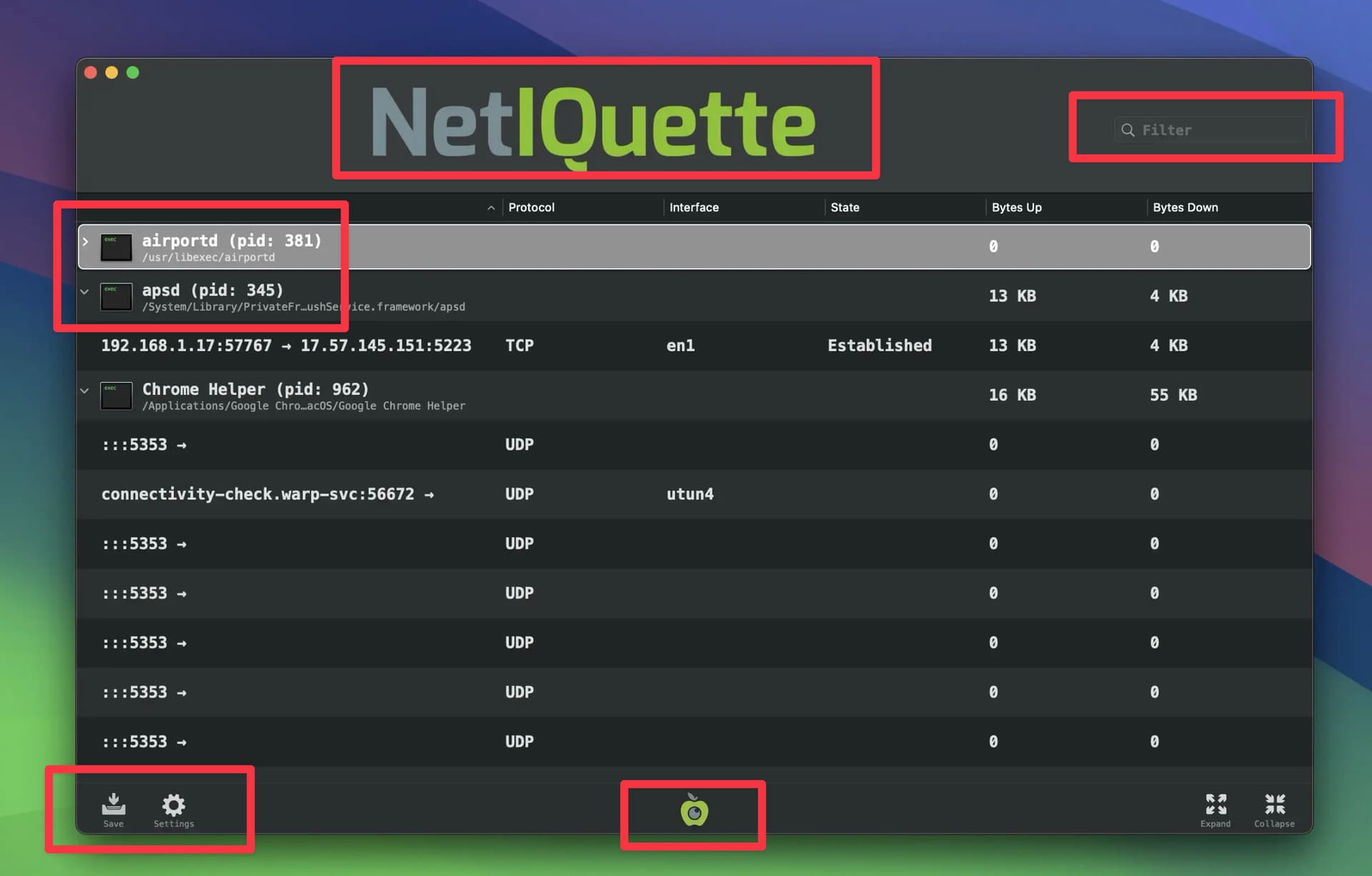
- ❌ Its network monitor (Netiquette) often shows IP addresses or cloud server names instead of the domain the app asked for.
- ❌ The interface is functional, but more technical than a typical Mac app.
Little Snitch vs LuLu: side-by-side
| Little Snitch | LuLu | |
|---|---|---|
| Price | Paid license | Free |
| Source code | Closed | Open source |
| Connection alerts | ✅ | ✅ |
| Silent / passive mode | ✅ Silent Mode | ✅ Passive mode |
| Network monitor | ✅ With map and charts | ✅ Netiquette, list view |
| Rule detail | App, domain, port, protocol, profiles | App or endpoint, profiles |
| Blocklists | ✅ Curated, auto-updated | ✅ From file or URL |
| Learning curve | Higher | Medium |
Always check the official sites for the latest features and pricing. Both apps are actively developed.
Which one should you pick?
Choose Little Snitch if:
- You want the most detailed rule system
- You like charts, profiles, and fine control over every connection
- You do not mind paying and learning a more advanced tool
Choose LuLu if:
- You want a free tool
- Open source is important to you
- You are fine with a simple, technical interface and occasional IP-only rules
The middle ground: TinyShield
Many people land between these two. Little Snitch feels like too much, and LuLu feels too bare. They want to see what each app does, then block it in one click.
That is the workflow TinyShield is built for.
What you get:
- ✅ One window for monitoring and blocking, grouped by app
- ✅ Hostnames and IP addresses for each app, plus a search field
- ✅ Block an app, domain, wildcard domain, or IP with a right-click
- ✅ Three simple modes: Allow All, Require Approval, and Block All
- ✅ GeoIP map to see where your traffic goes
- ✅ Native, modern macOS design
- ✅ One-time purchase, no subscription, with a Lifetime Deal option
Require Approval: alerts without the noise
Like the alert workflows in Little Snitch and LuLu, Require Approval pauses connections from apps TinyShield does not know yet. You see the app, its code signature, and its destinations, then choose Allow or Block. TinyShield remembers your choice.
Quick comparison with all three
| Little Snitch | LuLu | TinyShield | |
|---|---|---|---|
| Price | Paid | Free | Free to try, one-time PRO license |
| Readable domain names per app | ✅ | Partial | ✅ |
| Ask before new apps connect | ✅ | ✅ | ✅ (PRO) |
| Block everything by default | Via rules | ✅ Block mode | ✅ Block All (PRO) |
| GeoIP map | ✅ | ❌ | ✅ |
| Learning curve | Higher | Medium | Low |
Tip: run one firewall at a time
Running several connection filters together makes results confusing and can break connections. Test one, decide, then remove the others.
Conclusion
- Little Snitch is the power-user choice with the deepest rule system.
- LuLu is the best free and open-source choice.
- TinyShield is for people who want clear monitoring and quick blocking without a steep learning curve.
Want more detail? Read TinyShield vs Little Snitch, TinyShield vs LuLu, or learn how to see which apps are using the internet on Mac.
Download TinyShield or check the pricing plans.
Ready to Protect Your Mac?
Experience the power of TinyShield's network monitoring and protection. Keep your Mac safe from threats while maintaining optimal performance.
Download TinyShield